 Monitor Simulator
A free patient monitor simulator that runs in your browser
Put a tablet next to the manikin and it becomes the bedside monitor. You run the patient from your phone: heart rate, blood pressure, saturation, breathing, capnography and 22 ECG rhythms, changed live while the team works. A vital signs and cardiac monitor simulator for nursing, paramedic and medical training, without the price of one.
Works online in the browser. No account, no download, nothing to pay.
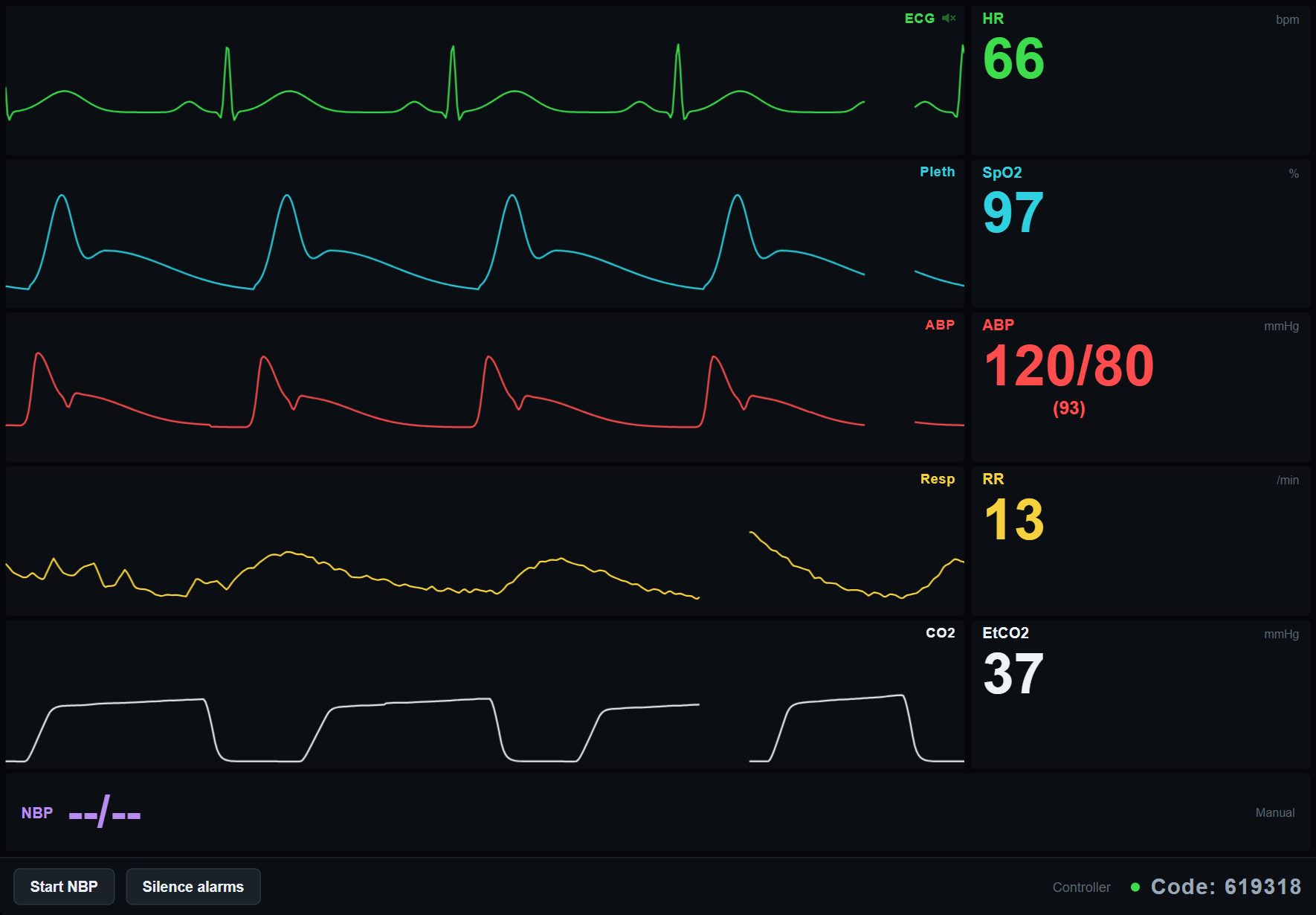
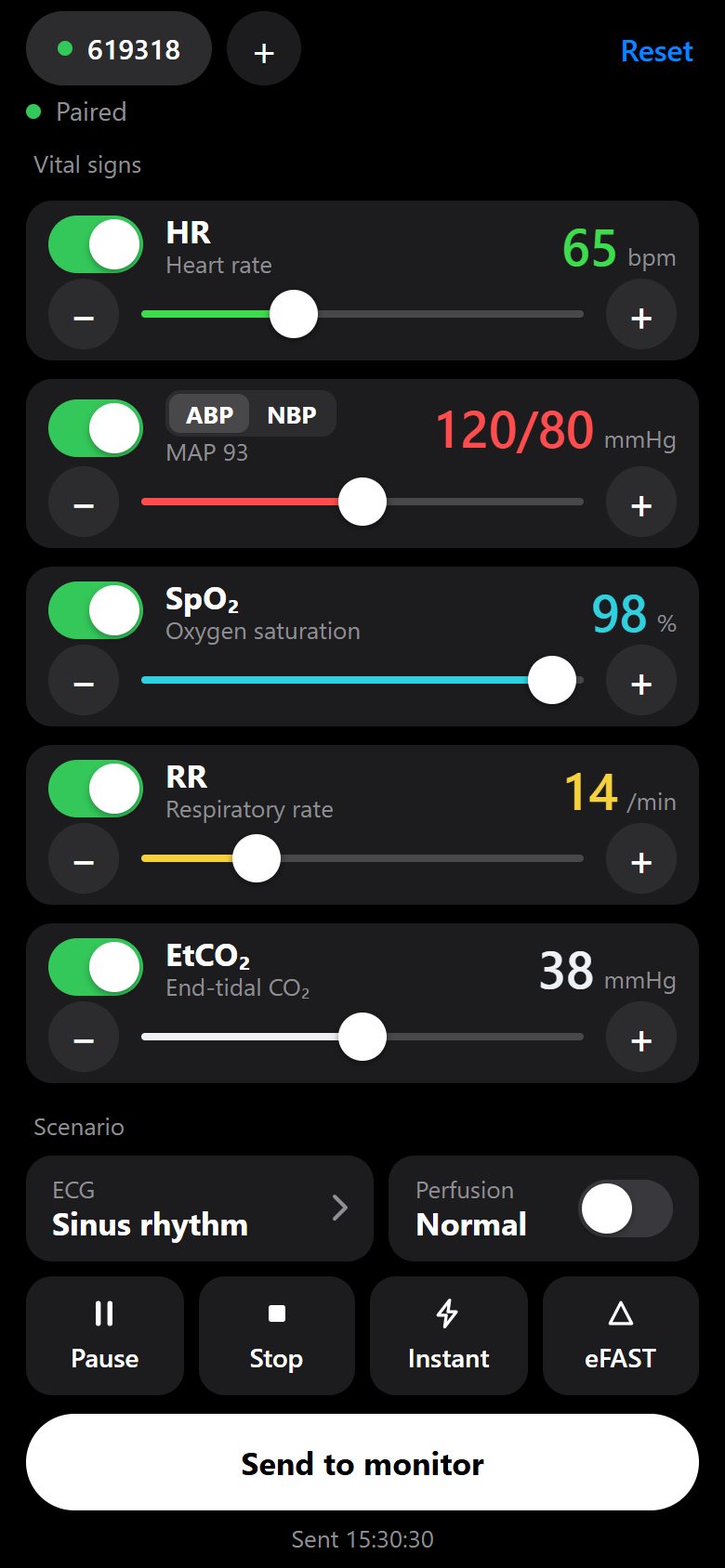
Two devices, one code
The monitor and the controller find each other over the internet, so they do not need to be on the same Wi-Fi. A spare iPad and the phone in your pocket are enough.
Open the monitor on the tablet
It shows a six-digit code in the bottom corner. Add it to the home screen and it runs full screen like a real monitor.
Type the code on your phone
The phone becomes the controller. One phone can run up to three monitors, each with its own patient.
Change the patient as you go
Set values and tap Send to monitor. Numbers glide in over a few seconds, or over up to 30 minutes when you want a slow deterioration.
Ready-made scenarios
Each scenario gives you the patient brief, the monitor values for every phase and what to change when the team gets it right or misses it.
Septic shock
An older patient with urosepsis who drifts from compensated to hypotensive.
MedicalAnaphylaxis
Minutes after an IV antibiotic. Tests how fast someone reaches for adrenaline.
TraumaHemorrhagic shock
The heart rate climbs long before the pressure drops. With eFAST loops.
TraumaTension pneumothorax
Falling saturation, then falling pressure. Lung ultrasound confirms it.
MedicalOpioid overdose
The capnograph sees it first. A good one for teaching what EtCO2 is for.
What the monitor shows
The waveforms are drawn live, not looped from a recording, so every change you make shows up the way it would on a real screen.
- ECG with 22 rhythms, from sinus rhythm to Wenckebach, pacing failure and VF. Test yourself on the practice strips
- Pleth and SpO2, with a weak trace when perfusion is poor
- Invasive arterial pressure with a dicrotic notch, plus MAP
- Non-invasive blood pressure, manual or cycling every 1 to 30 minutes
- Respiration and a capnography waveform with EtCO2 in mmHg or kPa
- Alarms, and a pulse tone that drops in pitch as the saturation falls
- eFAST ultrasound loops, normal and pathological, shown on the monitor
- Trends: let values drift over 1 to 30 minutes instead of jumping
See it running
A short walkthrough of pairing the two devices and running a patient.
Questions
Is it really free?
Yes. There is no paid tier, no trial and no account. We built it because we needed it for our own training.
What do I need?
A tablet or laptop for the monitor and a smartphone for the controller, both with a recent browser and an internet connection. iPad and iPhone work, so do Android devices.
Does the patient data go anywhere?
There is no patient data. The values you set exist only for the session and are cleared when the room has been empty for a while.
Can it replace a commercial patient simulator?
It replaces the monitor part. You still need a manikin or an actor for the hands-on parts, but you no longer need a dedicated monitor or a laptop running vendor software. See how it compares with other monitor apps.
Is there an app to download?
No. It is a web app, so it opens in Safari or Chrome. On an iPad or iPhone, tap Share and then Add to Home Screen, and it starts full screen from its own icon like any other app.
Can I use it as an ECG simulator?
Yes. The monitor shows 22 rhythms, including atrial fibrillation and flutter, SVT, VT, all degrees of AV block, hyperkalaemia, pacing with and without capture, PEA, pulseless VT, VF and asystole. See them all in the rhythm library.
Does it work for resuscitation and ACLS training?
It does. The arrest rhythms blank the pressure, saturation and EtCO2 the way a real monitor does, and you can raise EtCO2 during CPR or when you want to show return of circulation.
Can I show the monitor on a projector or a TV?
Open the monitor in a browser on a laptop connected to the projector. Anything that runs a modern browser can be the monitor, and anything with a touch screen can be the controller.
Does it need an internet connection?
Yes, both devices need to be online, because the controller reaches the monitor through our server. They do not have to be on the same network: the phone can be on mobile data and the tablet on hospital Wi-Fi.
Can several groups run scenarios at the same time?
Yes. Each monitor gets its own code and its own patient, so ten groups can run ten monitors. One phone can also control up to three monitors at once.
Which languages does the app support?
English, Spanish, Brazilian Portuguese, French, Italian, German, Swedish, Danish, Finnish and Norwegian. The app picks your browser's language.